Industry
Health / Public Health Nonprofit

Summary
A community health nonprofit uses Volunteer Management (Lightning) to run monthly medical camps. A volunteer finds the right program, completes onboarding, registers for shifts, and tracks his own contribution.

Persona
Marcus, Registered Nurse and Recurring Volunteer
.svg)
Goal
Find a health camp that matches his medical background. Complete the credential verification, sign up for the shifts and keep a personal record of hours and program history.

Challenge
Marcus volunteers for multiple health organizations and faces the same problems everywhere. Program information has limited visibility, and sign-ups are managed manually, which sometimes gets lost. He has nocentral record of his past attended health camps. Every time he volunteers for a new program, he has to start from scratch.

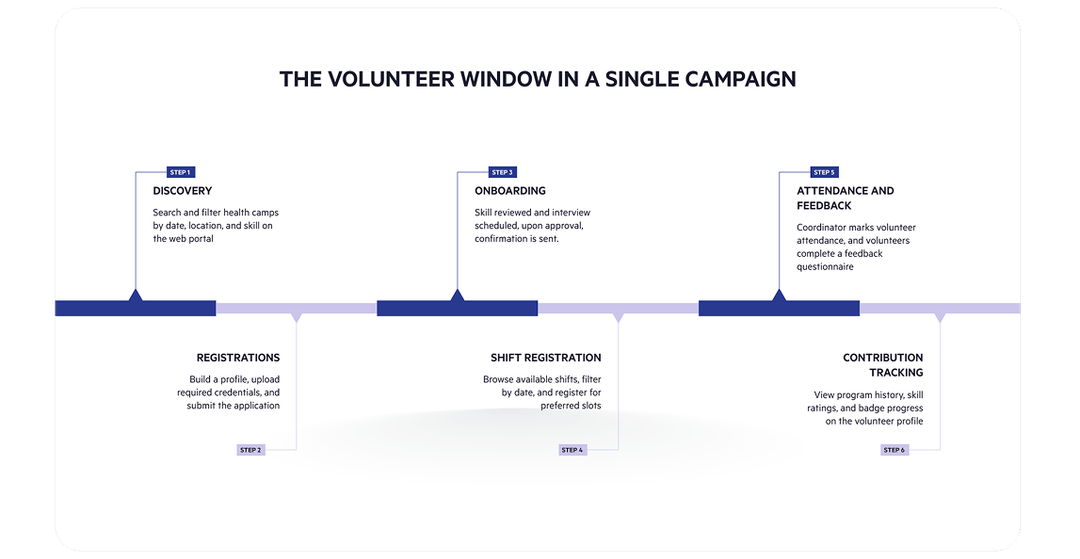
Marcus visits the nonprofit's volunteer portal and uses the search and filter tool to browse health camp programs by date, location, and skill category. He clicks into a program, reads the full program description, checks the map for the site location, and decides if it's the right fit.

He registers for the program and builds out his volunteer profile by adding his nursing credentials, experience, and preferred communication mode. The profile readiness indicator shows how complete his profile is and prompts him to fill any missing sections before applying. He uploads his license and work permit directly through the document upload section, which the program lists if required.

Marcus submits his application for the medical camp. Because the program requires verified clinical skills, his application is routed to a reviewer. Once his skills are reviewed, he receives a notification when an interview is scheduled. Once all skills are verified and his application is approved, he gets a confirmation with his shift details.

On the program detail page, Marcus can see all available shifts of the registered health camp. He filters shifts by date to find the ones that work for him and registers for two. If a shift reaches capacity while he is browsing, it’s automatically marked unavailable so he doesn’t register for a full slot.

On the day of the camp, Marcus gets marked as attended through the platform. He submits a post-camp feedback survey, which is automatically recorded against the program.

Marcus sees his updated contribution hours, the programs he has participated in, his skill ratings from reviewers, and his current badge level in his profile page. As he hits volunteering milestones, he earns badges that appear on his profile.
Expected Outcomes

Operational Efficiency
Marcus completes the entire journey from discovery to onboarding through one portal — no emails to confirm availability, no manual follow-ups, no spreadsheet to track hours.

Mission Impact
The nonprofit gets a verified, credentialed volunteer placed at the right medical camp, with all documentation collected and reviewed within the platform before event day.

Visibility & Reporting
Marcus holds a complete record of volunteer history, skills, and badge progress. The nonprofit gains reliable data on record for reporting and future program matching.
The right volunteers make healthier communities possible.
Discover how Volunteer Management helps you place qualified volunteers with the right skills.

.png)


.png)