.png)

.png)
Pega is a robust platform for case management, automation, and business process management. With Pega's DX API V2, developers can seamlessly integrate external systems, enabling them to create, update, and manage cases programmatically.
This API offers a RESTful interface, simplifying interactions with Pega’s case management system. It streamlines automation and external integrations, making it easier to connect Pega with other platforms in just a few steps.
Pega DX API V2 (Digital Experience API Version 2) is a RESTful API that enables developers to create, retrieve, and update cases, as well as interact with data within Pega. Designed for seamless integration with third-party applications, it streamlines communication and automates processes, making Pega more adaptable to external systems.
Create Case: Pega offers a powerful Case Management API that allows developers to programmatically create, manage, and update cases. One of its key capabilities is case creation through Pega’s RESTful API, enabling seamless automation and integration with external systems.
In Pega, a case is an instance of a work item that is created and processed through various steps until completion. When creating a case via the Pega OOTB API, you interact with the /cases endpoint.
End point URL: https:// <your-pega-instance>/api/v2/cases
Before creating cases, you need to set up and configure Pega DX API V2 in your application:
Ensure API Access – Verify that you have the necessary permissions to access Pega DX API V2 endpoints.
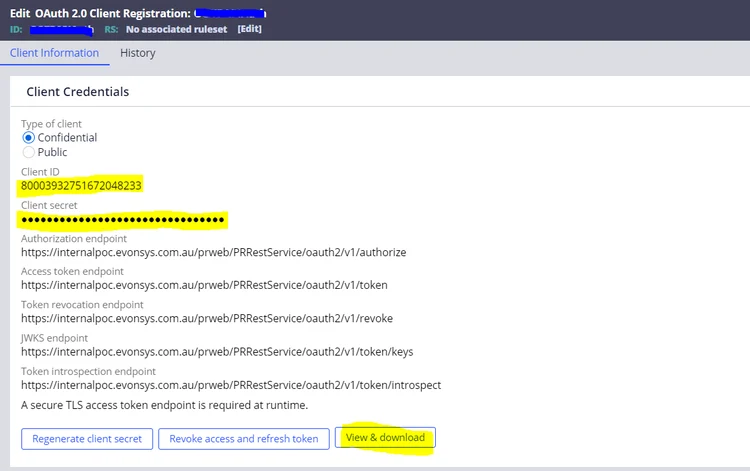
Authenticate with OAuth 2.0 – Configure a client ID and client secret to generate an access token for API requests.
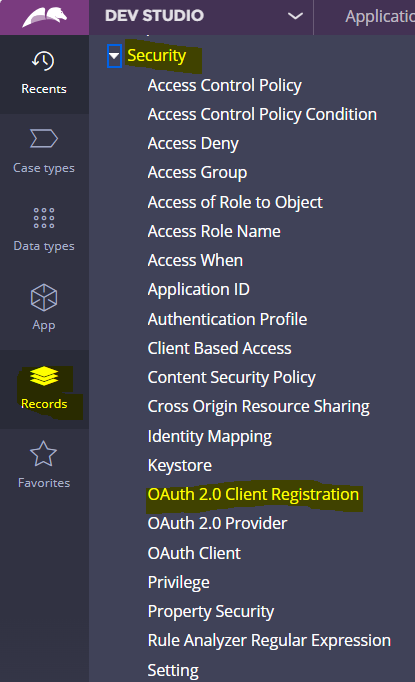
Create an OAuth 2.0 Client Registration Rule – This security rule is required to authenticate API requests and manage access control.
Want the full step-by-step guide to integrating Pega DX API V2 into your applications?

.png)


.png)