.png)

.png)
In our previous blog, we introduced the Application Signature Tool and how it removes one of the biggest barriers to modernization: understanding existing Pega applications.
But knowing why the tool matters is only the starting point.
To truly use it effectively, teams need clarity on a more practical question.
What exactly does the Application Signature Tool do, and how does it work in real scenarios?
The Application Signature Tool can be used for applications running on Pega Platform release 7.1.5 and later, making it relevant for a wide range of heritage systems that organizations continue to rely on today.
This blog takes a closer look at how the tool works, what it captures, and how it turns application discovery into a structured, usable output that directly supports modernization.
At its core, the Application Signature Tool performs read-only discovery of an existing Pega application.
It does not change the application, interrupt workflows, or require deep manual intervention. Instead, it analyzes how the application behaves and captures a structured view of its current state. This includes:
The output reflects how the application actually runs, not how it was originally designed or documented.
The tool is most useful when organizations need a faster and more cost-effective way to upgrade heritage Pega applications built on earlier platform versions.
This becomes especially relevant when tolerance upgrades are no longer enough to meet evolving business needs.
Instead of investing weeks in manual discovery, teams can generate a reliable view of the application in minutes and move forward with clarity.
Clarity is only useful if it is reliable and secure. The Application Signature Tool is built to give you both.
The tool focuses on “how the application behaves in real scenarios.”
It analyzes resolved cases to trace execution paths, understand how work is completed, and identify which parts of the application are actively used. This ensures that the output reflects the current state of the system, not an outdated or theoretical view. Only meaningful, in-use elements are carried forward into the discovery output.
The tool is designed with a strict read-only and metadata-only approach, ensuring that:
This makes it suitable for enterprise environments where data security and compliance are critical.
Traditional discovery often relies on documentation, static analysis, and input from subject matter experts. This approach can miss how the application behaves in real conditions.
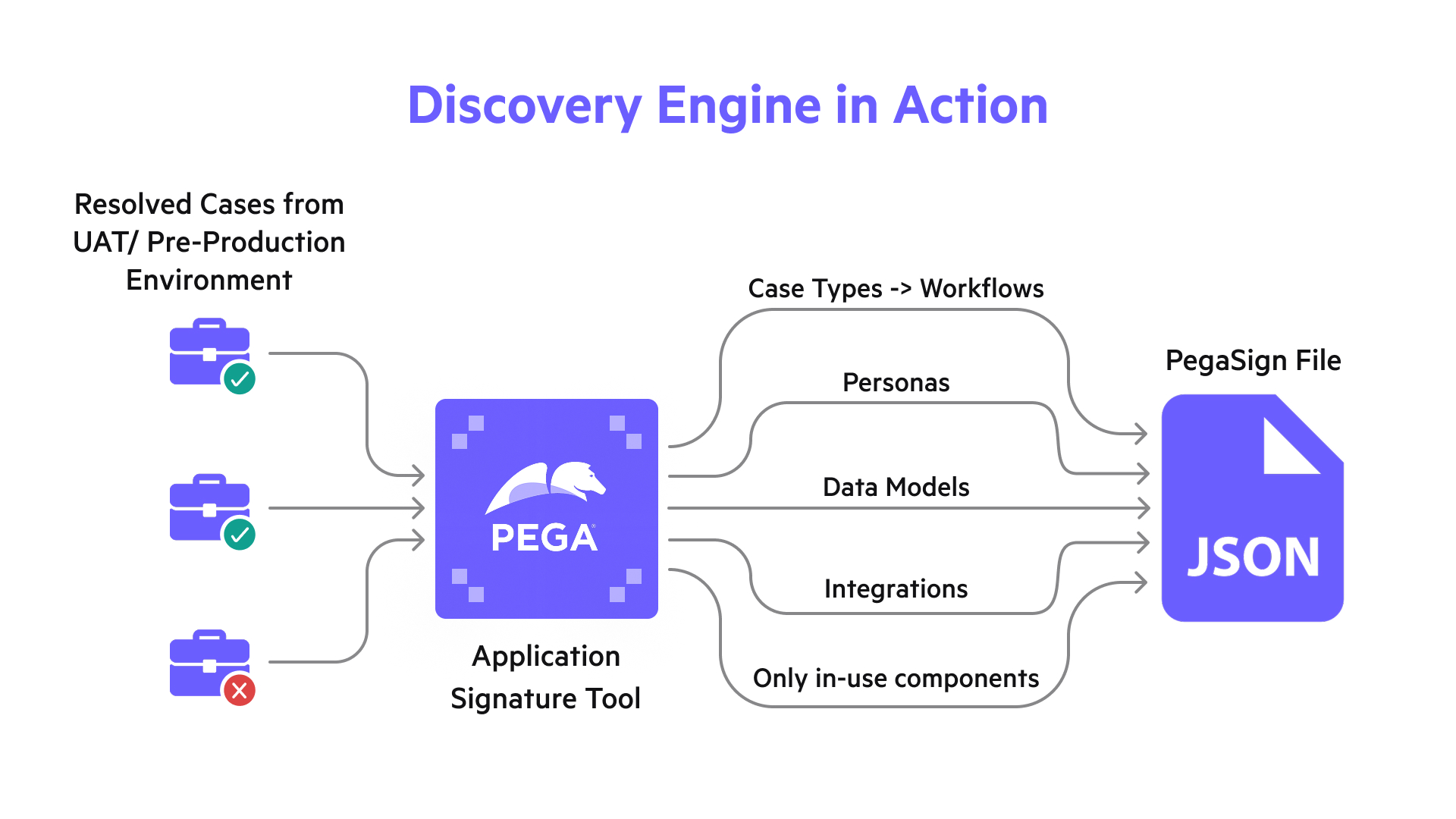
The Application Signature Tool focuses on actual execution. It analyzes resolved cases to understand how work moves through the system and how different outcomes are reached. This means:
The output reflects how the application operates today, based on completed work.
The quality of this view depends on the coverage of cases analyzed. Teams typically begin with a representative sample and expand it to include a range of outcomes such as completed, rejected, and canceled cases.
For the most accurate results, the tool is run in an environment that closely mirrors production, such as UAT or pre-production. This ensures the discovery captures real-world behavior across workflows.
By grounding discovery in actual case execution, the tool produces an output that is based on usage, free from assumptions, and aligned with how the application functions today.
Once discovery is complete, the Application Signature Tool generates a PEGASIGN file, a structured, encrypted JSON output. This file serves as the foundation for modernization.
Standardized format
Every application is captured in a consistent structure
Portable and reusable
Can be shared, analyzed, and imported across environments
Blueprint-ready
Designed specifically for seamless ingestion into Pega Blueprint
Instead of handing over raw data or fragmented insights, the tool produces a clean, structured artifact that represents the application in its current state.
The real value of the Application Signature Tool comes into focus when the PEGASIGN file is used in Pega Blueprint.
Once uploaded, the file is treated as a code analysis input. Blueprint uses it to generate a visual representation of the application, making it easier to understand how workflows, data, and personas come together
1. Current State Visualization
Blueprint turns the PEGASIGN file into a clear visual model of the application. Workflows, data relationships, and personas become easy to understand, giving teams a shared view of the current state.
2. AI-Assisted Reimagination
With this view in place, teams can refine workflows and improve efficiency. The existing structure acts as a starting point, making it easier to align processes with modern Pega standards.
3. Seamless Transition to Build
The refined Blueprint can be carried into the Pega Platform to create a modern application aligned with Constellation. This keeps the move from design to build direct and efficient.
The Application Signature Tool changes how modernization begins.
It replaces:
Organizations get:
It shifts modernization from a knowledge-driven exercise to a data-driven process.
For organizations running applications on Pega Platform 7.1.5 and later, with the Application Signature Tool, discovery is no longer the bottleneck.
Teams can quickly understand how their applications are structured and move forward with clarity.
This clarity changes how modernization begins. Teams start with a reliable view of the application, align faster, and move ahead without second-guessing.
What once slowed progress now becomes a clear starting point.
Modernization becomes more focused, more practical, and easier to execute across applications.
New to Pega Application Signature Tool?
Start with the basics before diving deeper.

.png)


.png)